GPS-free Autonomous Drone Navigation
Introduction
Project Goal
The goal of our project is to develop a GPS-less autonomous navigation system for a Tello drone that uses real-time camera input for environmental awareness and object tracking. The system enables the drone to visually detect a target object, navigate toward it, and land precisely when it reaches a predefined proximity threshold—all without relying on GPS. This involves implementing robust sensing, planning, and actuation components to ensure the drone can perform in GPS-denied environments such as indoors or in constrained outdoor areas.
Interesting Challenges
- Navigating in GPS-Denied Environments: Most autonomous drones rely heavily on GPS for localization and navigation. Designing a system that operates without GPS requires innovation in computer vision and state estimation.
- Object Detection and Tracking in Real-Time: The system must process video frames in real-time, perform noise reduction, and track the target object despite changing lighting conditions, motion blur, and dynamic backgrounds.
- Combining SLAM and Object Tracking: Balancing the integration of SLAM (Simultaneous Localization and Mapping) for navigation and object tracking for interaction poses an interesting problem in resource management and system design.
- Precise Landing: Landing safely on or near the target using only visual feedback is a non-trivial problem that involves accurate distance estimation, trajectory planning, and control. These challenges push the boundaries of what a lightweight and affordable drone platform like the Tello can achieve, making the project a valuable exploration into advanced robotics.
Real-World Applications
The work from our project has numerous real-world applications, particularly in environments where GPS signals are unavailable or unreliable. In search and rescue operations, GPS-less drones can navigate through disaster-stricken areas such as collapsed buildings or dense forests to locate survivors, equipment, or specific markers. Similarly, in indoor navigation, drones equipped with visual navigation systems can be used for warehouse management, inventory tracking, or package delivery in large facilities or urban environments where GPS access is limited. In the field of agriculture, GPS-free drones can autonomously navigate greenhouses or tightly planted crop fields to monitor plant health, identify issues, or perform precise, localized spraying. Additionally, in surveillance and inspection, such drones can operate in hard-to-reach or confined spaces, such as industrial machinery, power plants, or other areas where GPS signals are obstructed, providing a valuable tool for routine maintenance and monitoring.
Design
Functionality and Design Choices
Our desired function for the drone is to enable it to detect certain objects, fly towards them, and perform specific actions. Since the Tello drone is small and adding additional hardware might compromise its robustness, we decided that the action would be landing in front of the target.
Initial Approach and Challenges
Our original design involved using object detection to first detect the object, followed by visual SLAM to build a local map for path planning. However, we faced challenges such as installation issues with ROS and PySLAM. We also tried other SLAM implementations, but the results were unsatisfactory. For example, even slight drone movements caused significant pose estimation drift. These issues forced us to explore alternative design choices.
Final Design Solution
Ultimately, we decided to use PID control directly in the pixel space, aiming to control the drone so that the pixel center aligns with the center of the detected object. To ensure the drone moves towards the target, we send a constant throttle command to the drone. The forward movement is halted if the detected object appears too large, indicating close proximity. Through testing, we determined that this design works effectively.
Optimization and Trade-offs
To improve the robustness of detection and tracking, we fine-tuned the PID control parameters and set the drone's movement velocity to a low value. This adjustment was necessary because a lag between the video feed and the drone's actions could sometimes cause the target to move out of the frame if the drone moved too quickly. As a tradeoff, we reduced the speed during movement. Once these parameters were optimized, our drone was able to detect objects and fly towards them reliably.
Design Limitations
Object Detection Constraints
One limitation of our design is that the initial object detection state is deterministic. The drone follows a predetermined path, which, in our case, is rather simplistic. In real-world scenarios, more complex trajectories or exploration strategies might be needed to ensure the drone can detect objects accurately.
Hardware Limitations
Another limitation is durability. The drone cannot fly for extended periods due to rapid battery depletion. This means our design is limited to short-duration flights, which poses a challenge for real-world engineering applications requiring longer operational times.
Implementation
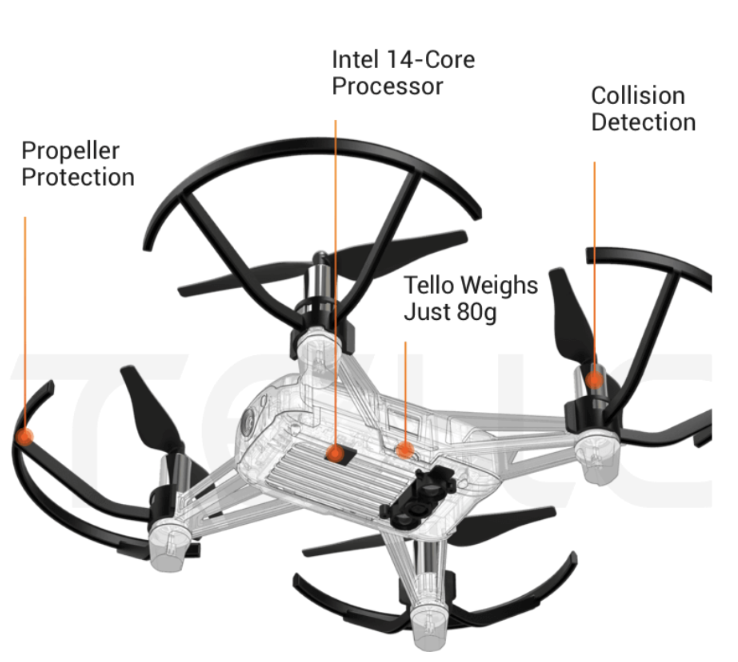
Hardware Specifications
Drone Specifications
- Weight: 80g (with propellers and battery)
- Dimensions: 98×92.5×41 mm
- Propeller: 3 inches
- Camera: 5MP (2592x1936)
- FOV: 82.6°
- Video: HD720P30
Built-in Functions
Built-in Functions: Range Finder, Barometer, LED, Vision System, 2.4 GHz 802.11n Wi-Fi, 720p Live View.
Software Dependencies
Key Python libraries used in implementation:
- time: For timing and delay operations
- cv2: OpenCV for image processing and computer vision tasks
- imutils: Image processing utilities and convenience functions
- tellopy: Unofficial Tello drone control interface
- av: For handling video streams from the drone
- numpy: Numerical computing and array operations
Development Environment
Initially experimented with various setups for ROS integration:
- Tested Ubuntu VMs but faced performance issues with video streaming
- Attempted Docker containers but encountered networking complexities
- Finally settled on Robostack - a conda-based distribution that enabled running ROS and RViz natively on MacOS
- Development done on MacOS Big Sur 11.05.2 for consistent performance
Algorithms Used
1. Camera Streaming Algorithm
Purpose: Establishes a real-time video stream from the Tello drone for visual tracking.
Steps:
- Connection Setup: Connect to Tello drone and start video stream
- Stream Handling: Manage video stream with av library
- Frame Retrieval: Extract and convert frames to OpenCV format
- Error Management: Handle AVError exceptions gracefully
2. Frame Processing Algorithm
Purpose: Process frames for color-based target detection and tracking.
Steps:
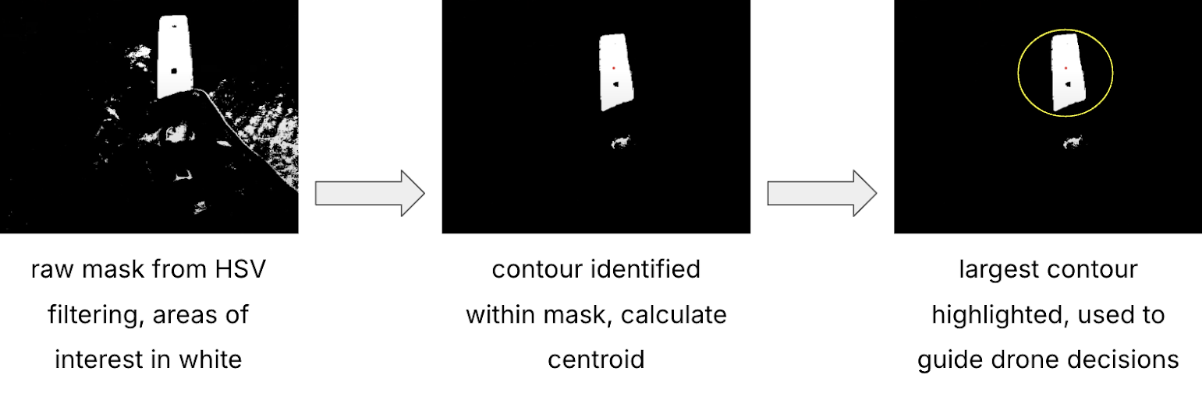
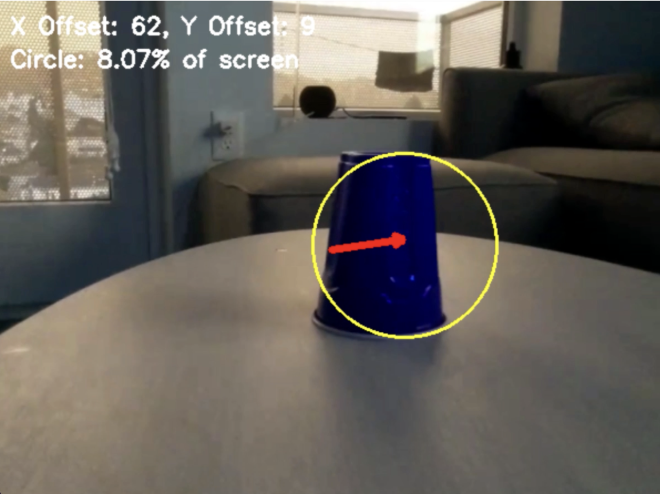
- Pre-Processing: Apply blur and convert to HSV
- Target Detection: Use HSV bounds and morphological operations
- Contour Analysis: Find and analyze target contours
- Offset Calculation: Determine target position relative to center
- Visualization: Draw tracking indicators and annotations
3. Drone Exploration Algorithm
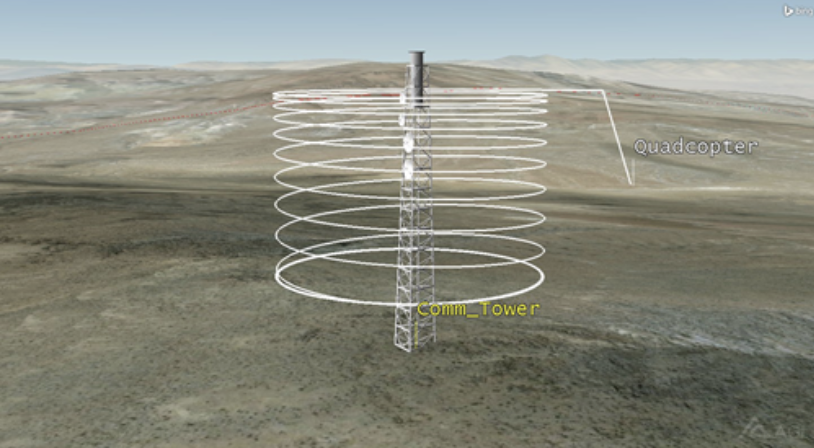
Purpose: Enable autonomous target search when not in view.
Steps:
- Initialization: Begin spinning motion and altitude maintenance
- Detection Transition: Monitor frames and switch to tracking
- Fallback: Return to exploration if target lost
- Adaptive Movement: Adjust search patterns dynamically
4. PID Control Algorithm
Purpose: Ensure precise movement control based on target position.
PID Values:
- Horizontal Control: Kp = -0.5, Ki = 0.01
- Vertical Control: Kp = 0.001, Ki = 0.0001
Steps:
- Error Calculation: Compute and normalize positional error
- PID Components: Calculate P, I, and D terms
- Output Computation: Generate controlled movement commands
- Command Execution: Apply yaw and throttle adjustments
- Dynamic Updates: Maintain real-time error correction
System Workflow
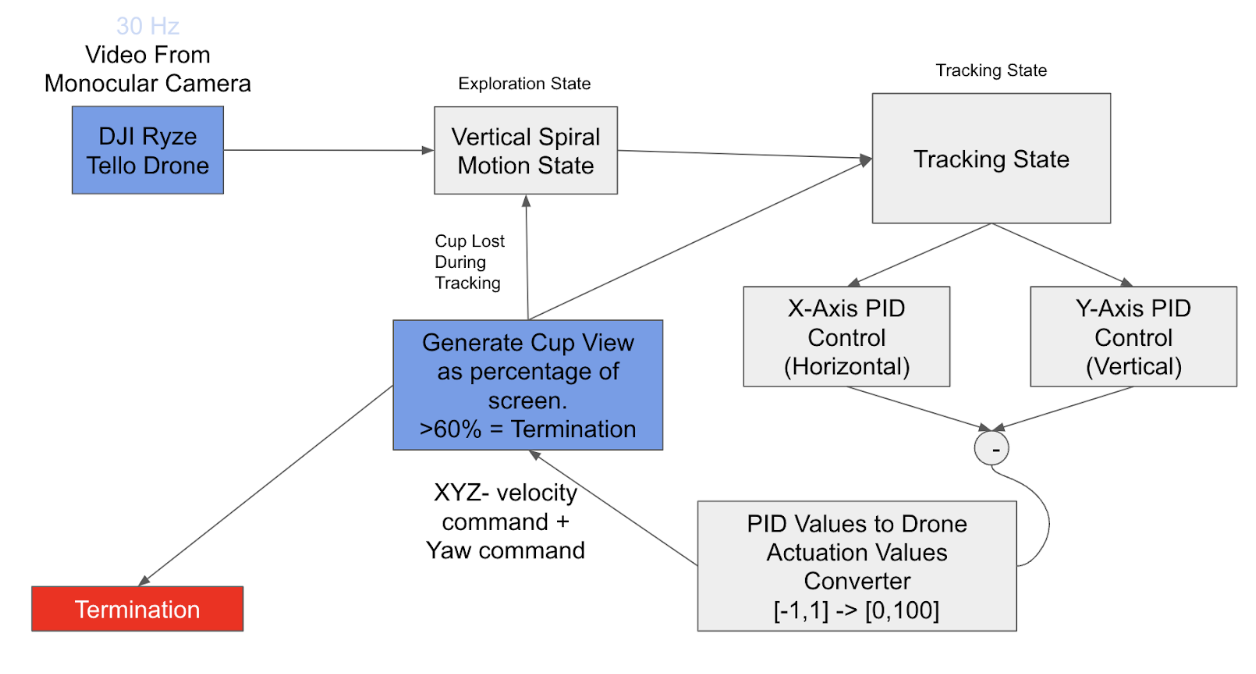
Step 1: Initialization
- The drone connects to the Tello API, sets up its video stream, and initializes parameters for exploration and tracking.
- The system initializes the PID controllers for yaw (horizontal rotation) and throttle (vertical movement).
Step 2: Cup Finding State
- The drone begins in the Cup Finding State, spinning in place to search for the target (the cup).
- The camera stream is processed frame by frame and the frames are analyzed for the presence of a red-colored object using HSV filtering.
- If no target is detected, the drone continues spinning and stabilizing its altitude using a low throttle setting.
Step 3: Target Detection
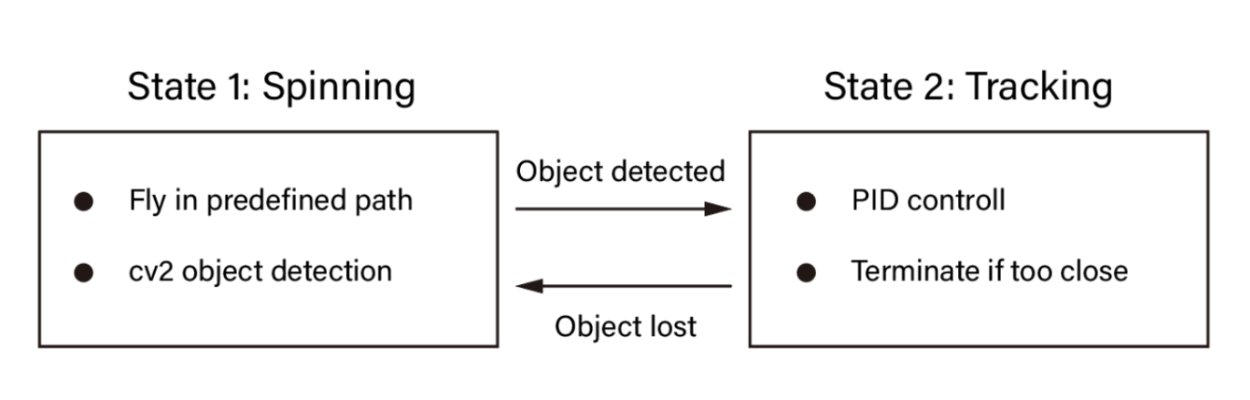
- When the target is identified, the system transitions to the Tracking State.
- The drone stops spinning and begins using the PID controller to align with the target's position.
Step 4: Tracking State
- In the Tracking State, the drone actively follows the target using PID control.
- The frame's offset data (x, y) and the target's size (radius) are fed into the PID controllers.
- The PID outputs adjust the drone’s yaw and throttle to keep the target centered in the frame.
Step 5: Proximity Detection
- The system monitors the size of the detected target (percentage of the screen area).
- When the target occupies a predefined area of the frame (e.g., 60%), the drone initiates a landing sequence.
- If the target is lost during tracking, the system reverts to the Cup Finding State.
Step 6: Landing
- Once the target is deemed close enough, the drone lands autonomously by cutting forward motion and reducing throttle to zero.
States of Operation
Cup Finding State
Objective: Search for and identify the target cup.
Actions:
- Clockwise spinning search
- Altitude maintenance
- Continuous frame processing
- HSV color filtering for detection
Transition Condition: Target detected in frame
Tracking State
Objective: Lock onto target and align position.
Actions:
- PID controller adjusts yaw based on horizontal offset
- Throttle adjustment based on vertical offset
- Forward movement when target below threshold
- Continuous target tracking
Transition Condition: Target size >60% or target lost
Landing State
Objective: Safe landing when target is close.
Actions:
- Forward velocity zeroing
- Gradual throttle reduction
- Ground detection landing
Transition Condition: Ground contact detected
PID Control System
Implementation of dual-axis PID control:
- Horizontal Control: Kp = -0.5, Ki = 0.01
- Vertical Control: Kp = 0.001, Ki = 0.0001
- Target size-based distance control
- Automatic mode switching for target loss
Results
Our implementation successfully achieved the project goals across three test scenarios:
Setting 1: Direct Target Visibility
- Target visible from start position
- Demonstrated accurate direct flight path
- Successful landing sequence execution
Setting 2: Target Search and Detection
- Target initially out of view
- Successful exploration pattern execution
- Smooth transition to tracking state upon detection
Setting 3: Target Relocation
- Target moved during flight
- Successful state transition back to search mode
- Re-acquisition and tracking of relocated target
- Complete landing sequence at new location
Conclusion
Results and Limitations
Our solution successfully implemented a functional navigation and landing PID controller. By using a PID controller for path planning and color-based object detection via HSV masking, we were able to track predefined colors and stop at waypoints based on certain threshold values. It met the core design criteria of allowing navigation in a GPS-free environment. However, limitations include simple detection and controls due to hardware constraints. Ambitious goals of including SLAM for localization or advanced object detection with machine learning were also cut.
Challenges
Particular difficulties arose, primarily during setup. Firstly, hardware constraints, such as the simple nature of Tello drones, limited our perception stack to just one monocular camera. Difficulties arose because Tello drones required Wifi connectivity, and our group did not possess a computer with Linux and Wifi, so we relied on Robostack, in order to cross platform ROS with MacOS. Many SLAM implementations were buggy, and pySLAM did not support live video streaming, requiring us to make further adaptations. Finally, trajectory data collected was noisy, leading to extra time spent during development.
Future Improvements
- Reliance on color-based object detection is sensitive to lighting conditions, it would have been preferred to use a deep learning model like YOLO for a more robust target identification
- Our navigation system uses a fixed spiral path, which will only work in open areas. By replacing a fixed spiral path with a dynamic path planner based on SLAM, our drone would have more environmental awareness.
Team Members
Members
- Andy Weng: Andy helped with the pySLAM modules, path planning, and testing in-flight drone features.
- Jacob Shen: Jacob mainly worked on the path planning and navigation system, and also worked on testing in-flight drone features.
- Rhythm Seth: Rhythm Seth: Rhythm helped with doing CV cup detection, implemented the PID controller that helps the drone navigate to the cup and also worked on helping get setup for the project.
- Raymond Tsao: Raymond also helped with doing CV cup detection, implemented the PID controller that helps the drone navigate to the cup and also worked on helping get setup for the project.
- Jeff Liu: Jeff worked on helping get setup ready - figuring out the Tello API and Robostack, and also worked on helping test in-flight drone features.
Additional Materials
Github Project Repository: https://github.com/andy-weng/106a-final-project